Choose Your Perfect Plan
Standard
Contact us
Premium
Contact Us
Self-Hosted
Contact us
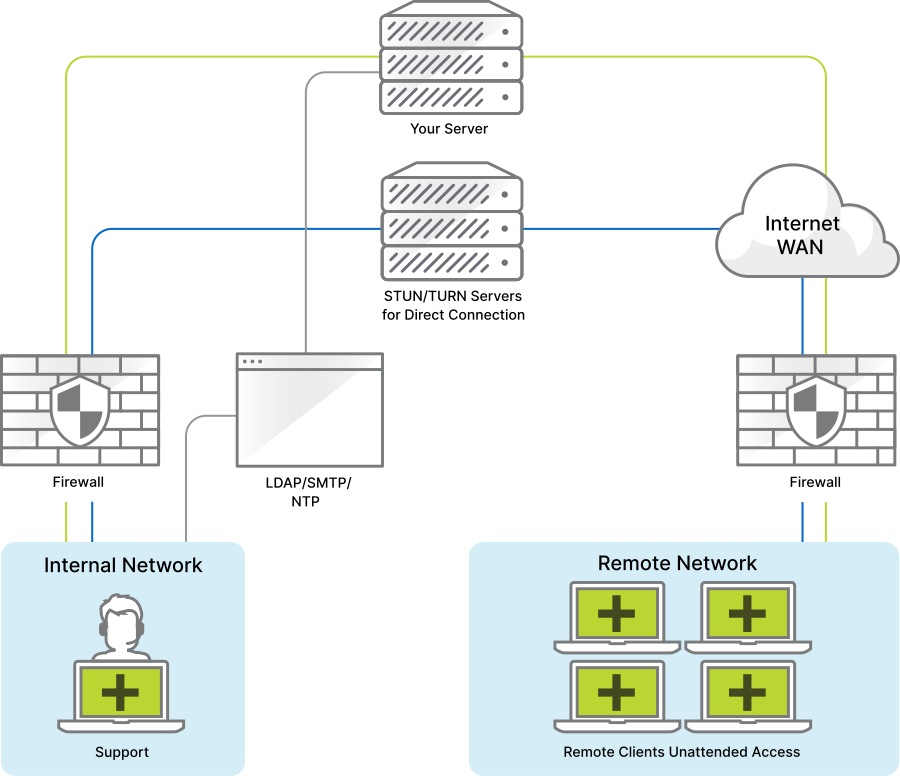
Host ISL Online on Your Own Server
Run ISL Online in a fully self-hosted environment to meet advanced security, compliance, and privacy requirements.
All remote connections, user data, and session history stay within your infrastructure, giving you complete control and independence.
The server supports standard ports (80, 443, 7615) and can integrate with STUN/TURN, NTP, SMTP, and external authentication services such as SAML SSO or LDAP.
Enterprise
Hard Limit: The purchased number of licenses represents a technical limitation of the maximum number of users that may simultaneously establish sessions through the MPC.
Soft Limit: The number of concurrent users that may simultaneously establish sessions through the MPC is technically unlimited. A monthly service fee will be calculated based on the usage report.
Both MPC licensing options start with 20 licenses (concurrent users).
Contact Us
Get in touch with our sales team for a great offer!
15-day money back guarantee. Prices in USD, tax not included.
Need personalized quote or more information?
Contact us
Compare our Planslink
| Starter | Standard | Premium | Self-Hosted | Enterprise | |
|---|---|---|---|---|---|
| License | |||||
|
Concurrent users
The number of purchased licenses determines the maximum number of concurrent users within your organization. A concurrent user is anyone who runs one or multiple sessions at the same time from any device. For example, with 3 licenses, users A, B, and C can each run multiple concurrent sessions on their devices, while additional users will need to wait for an available license to start their session. |
One | One per license | One per license | One per license | One per license |
|
Managed devices
The maximum number of computers where a remote agent (ISL AlwaysOn) can be installed, allowing for unattended remote access by licensed users. Starter plan includes 10 managed devices, and the Standard plan includes 1000. While the Premium, Self-Hosted, and Enterprise plans offer unlimited devices, fair usage policies apply with an initial limit of 5000 managed devices, which can be increased by contacting support. This limit ensures that resources are utilized in a manner that does not negatively impact service performance. |
10 | 1000 | Unlimited | Unlimited | Unlimited |
|
Licensed users
The maximum number of users within your organization that are able to log in and start attended sessions (to remotely support end-users) or unattended sessions (to remotely access Managed Devices). Starter plan includes 1 licensed user, and the Standard plan includes 40. While the Premium, Self-Hosted, and Enterprise plans offer unlimited licensed users, fair usage policies apply with an initial limit of 55 licensed users, which can be increased by contacting support. This limit ensures that resources are utilized in a manner that does not negatively impact service performance. |
One | 40 | Unlimited | Unlimited | Unlimited |
| Connect from (devices) | Unlimited | Unlimited | Unlimited | Unlimited | Unlimited |
| Connect to (end-users) | Unlimited | Unlimited | Unlimited | Unlimited | Unlimited |
| Validity | 12 months | 12 months | 12 months | 12 months | 12 months |
| Updates & upgrades | Free | Free | Free | Free | Free |
| Hosting | Cloud | Cloud | Cloud | On-Premises | Private cloud |
| Customer support | Account manager | ||||
| Mobile device support | |||||
|
Standard customisation
Add your branding and customise ISL Online to match your workflow. Standard Customisation: Incorporate your logo, change colours, application names, icons, and key visuals by default. Advanced Customisation: Take full control of the remote desktop session workflow. Automate actions, adjust app behavior with command line arguments, or integrate ISL Online with third-party services using our API calls. Learn more about customisations |
N/A | ||||
| Premium Services | |||||
|
Single sign-on
Users from your organization are able to log into their ISL Online account through your SSO identity provider (e.g., Microsoft Entra, Okta, etc.) via the secure SAML 2.0 protocol. Please follow our instructions to properly configure SSO for your organization. Learn more about SSO |
N/A | N/A | |||
|
Advanced customisation
Add your branding and customise ISL Online to match your workflow. Standard Customisation: Incorporate your logo, change colours, application names, icons, and key visuals by default. Advanced Customisation: Take full control of the remote desktop session workflow. Automate actions, adjust app behavior with command line arguments, or integrate ISL Online with third-party services using our API calls. Learn more about customisations |
N/A | N/A | |||
|
Premium support
Our global support team is here to assist you on weekdays from 08:00 to 22:00 Central European Time (CET), with exceptions on January 1st, May 1st, and December 25th With Premium Support, you receive fast-track assistance, ensuring your queries are answered with utmost priority. Learn more about SLA |
N/A | N/A | N/A | ||
| Security | |||||
| Two-factor authentication | |||||
| AES 256-bit end-to-end encryption | |||||
| RSA 2048/4096-bit key exchange | |||||
| Port filtering | |||||
| Forward proxy support | |||||
| Reverse proxy support | N/A | N/A | N/A | ||
| Allow / deny list | |||||
| Remote desktop features | |||||
| Remote support | |||||
| Unattended access | |||||
| Connect via RDP/SSH | |||||
| Share my screen | |||||
| Pause a session | |||||
| Invite an operator | |||||
| Transfer remote session | |||||
| Select region | |||||
| Administrative mode | |||||
| Restart and reconnect | |||||
| Record a session | |||||
| File manager | |||||
| Chat | |||||
| Audio/video call | |||||
| Multiple monitors | |||||
| Whiteboard tools | |||||
| View options | |||||
| Change screen resolution | |||||
| Colour depth | |||||
| Clipboard | |||||
| Keyboard commands | |||||
| Quick launch | |||||
| System info | |||||
| Stream remote sound | |||||
| Black screen (curtain mode) | |||||
| End of session notes | |||||
| Email invite | |||||
| Unattended access features | |||||
| Custom deployment link | N/A | ||||
| Computer groups | |||||
| Share computers | |||||
| File sharing | |||||
| Access password | |||||
| Notifications | |||||
| Local user consent | |||||
| Auto-lock on start | |||||
| Automatic session recording | |||||
| Enable access filters | |||||
| Computer access history | |||||
| Management features | |||||
| Administration | |||||
| Reports | |||||
| User management | |||||
| Permissions | |||||
| Manage license usage | |||||
| REST API | N/A | ||||
| External authentication | N/A | N/A | |||
Frequently asked questionslink
Everything you need to know about the product and billing.
-
What is a concurrent user?
The number of purchased licenses determines the maximum number of concurrent users within your organization. A concurrent user is anyone who runs one or multiple sessions at the same time from any device.
For example, with 3 licenses, users A, B, and C can each run multiple concurrent sessions on their devices, while additional users will need to wait for an available license to start their session.
-
What is a session?
You start a remote desktop session when you connect to a remote computer or a mobile device.
-
How many remote clients can I support?
You may connect to an unlimited number of clients (end-users) to provide remote support.
-
How many managed devices can I have?
Starter plan includes 10 managed devices, and the Standard plan includes 1000.
While the Premium, Self-Hosted, and Enterprise plans offer unlimited devices, fair usage policies apply with an initial limit of 5000 managed devices, which can be increased by contacting support. This limit ensures that resources are utilized in a manner that does not negatively impact service performance.
-
How many licensed users can I have?
Starter plan includes 1 licensed user, and the Standard plan includes 40.
While the Premium, Self-Hosted, and Enterprise plans offer unlimited licensed users, fair usage policies apply with an initial limit of 55 licensed users, which can be increased by contacting support. This limit ensures that resources are utilized in a manner that does not negatively impact service performance.
-
How do I get an invoice?
After purchasing licenses from our online shop, you can find your invoice in the ISL Online web dashboard. If you have purchased licenses through our local offices or partners, you will receive a copy of your invoice from them.

Recommended by Our Userslink




Users' Feedback is What We Value the Mostlink


"All around easy to use, be it on client end, agent end or supervisor/admin. Small file size so the set up on customer end is swift and we can go to resolving the issue quickly."
Klemen K., Team Leader
Banking

"I love this software. The customer service is amazing and anything I need help; they are always there to help me."
Cecil D., IT Coordinator
Education Management

"ISL Light is one of the rare remote tools that supports multi-monitors super easily, which was one of the most important features I looked for."
Verified User, Head of IT
Information Technology

"Numerous features that I haven't seen in other commercial software like connecting via Microsoft's RDP, better control over image/quality settings, ability to change resolution, ability to split different monitors to different windows and most importantly - simulate text feature."
Amir A., IT Team Lead
Computers & Gaming
"ISL is extremely easy to deploy. It is versatile and works on pretty much ANY OS. I use it daily on Linux (OpenSUSE) and Windows."
Adam G., Director
Hospital & Health Care
"I am highly impressed with the speed and efficiency of their software. Having used remote access software from various major brands, I can confidently say that ISL stands out, especially in terms of quick access and swift screen redraws at the technician's end."
Luis P., IT Manager
Computer and network security
"This is so easy to install and has a very light footprint on the computer it is running on and is great that it works on a Mac or a Windows PC or Server."
Martin M., IT Manager
Apparel & Fashion
"We often carry out multi-session remote maintenance, where we manage up to 8 devices at the same time. The software always ran 100% reliably. No crashes, no problems, everything fits perfectly."
Andreas S., Head of IT
Information Technology and Services
"Brilliant, we've been with them for 4-5 years now after switching from Log me in. Its very easy to use, quick to connect to users machines and never seems to freeze or have connection issues, which is vital to our business."
Gary P., Managing Director
Hospital & Health Care

"No version hassles like competitors or extreme pricing for features. It has an API so we can nicely integrate it in our website so we can create easy ready to go sessions for clients without needing to pass ID's and passwords etc."
Bart V., CEO
Information Technology and Services
"I love that you can self host ISL and your license comes with everything without a bunch of addons. The service has been super stable and easy to administrate/update with no real issues."
Kris K., CEO
Information Technology and Services
"Easily the best IT Tool I have in my "kit bag" it has all I need to help support my end users on both Windows and Apple computers, as well as Mobiles."
Stuart S., IT Director
Information Technology
"Overall, this has been a great tool. I have used many other software in this field but so far this one is the best value."
Walter W., Network Administrator
Commercial Real Estate
"What I like most about ISL is the ease of connection, the environment and file transfer, it has many additional utilities, one of the ones I use the most is writing text from the clipboard for when it doesn't allow pasting on the type of screen."
Aaron A., IT Support
Computer Networking
Try 15 Days For Free
Enjoy your new remote desktop experience!
No credit card required.

Bundle with PDQ: Secure, Patch, and Manage Devices
Discover PDQ Connect - a modern tool for managing remote and local devices. Automate deployments with prebuilt and custom packages, gain essential inventory insights, patch vulnerabilities automatically, and support end users with built-in remote desktop.
