Visualizza schermo remoto
Sfruttate la potenza del software di desktop remoto per aumentare la vostra produttività.
Scarica ISL Remote DesktopAssistenza remota
È sufficiente avviare una sessione di assistenza remota e chiedere al cliente di unirsi ad essa. Visualizzate e controllate il dispositivo del cliente per fornire assistenza tecnica senza alcuno sforzo.
Vendite remote
Aumentate le vendite condividendo il vostro schermo con i potenziali clienti. Presentate i vostri prodotti o servizi in tempo reale, offrendo un'esperienza di vendita coinvolgente e interattiva
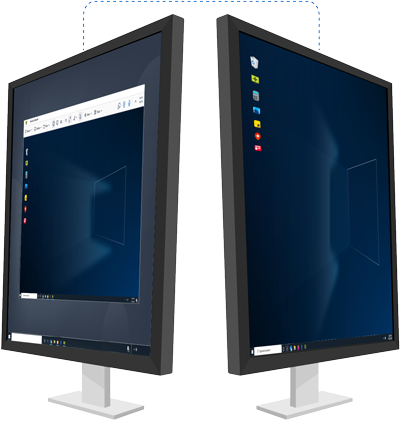
Accesso remoto
Accedete e gestite in modo sicuro i vostri dispositivi remoti non presidiati da qualsiasi luogo, assicurandovi di rimanere sempre produttivi e connessi.
Lavoro in remoto
Accesso sicuro al computer dell'ufficio da casa o in viaggio. La tecnologia di condivisione dello schermo consente di lavorare in modo efficiente da remoto in qualsiasi momento e da qualsiasi parte del mondo.
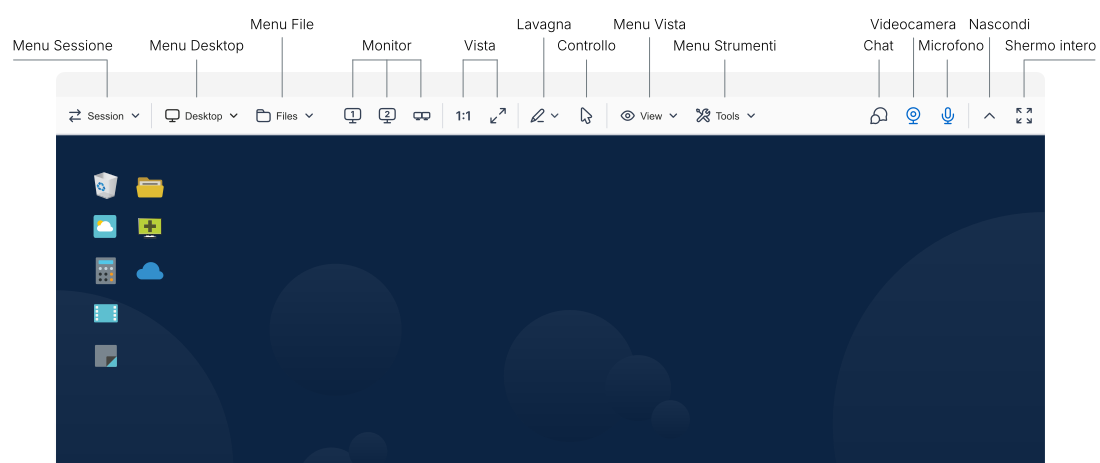
Controlla desktop remotolink
Tutto ciò che serve per gestire i dispositivi remoti è a portata di mano.
Per saperne di più sulla barra degli strumenti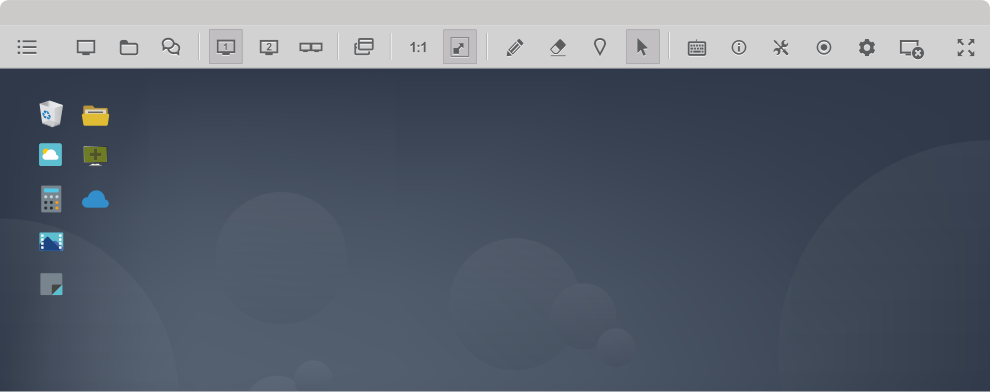
Gestione completalink
Ottenete una panoramica completa di gruppi di computer, utenti e gruppi di utenti. Configurare facilmente le impostazioni a livello di dominio e di utente. Utilizzate gli strumenti di audit per monitorare gli eventi a fini di responsabilità.
Per saperne di più sull'amministrazione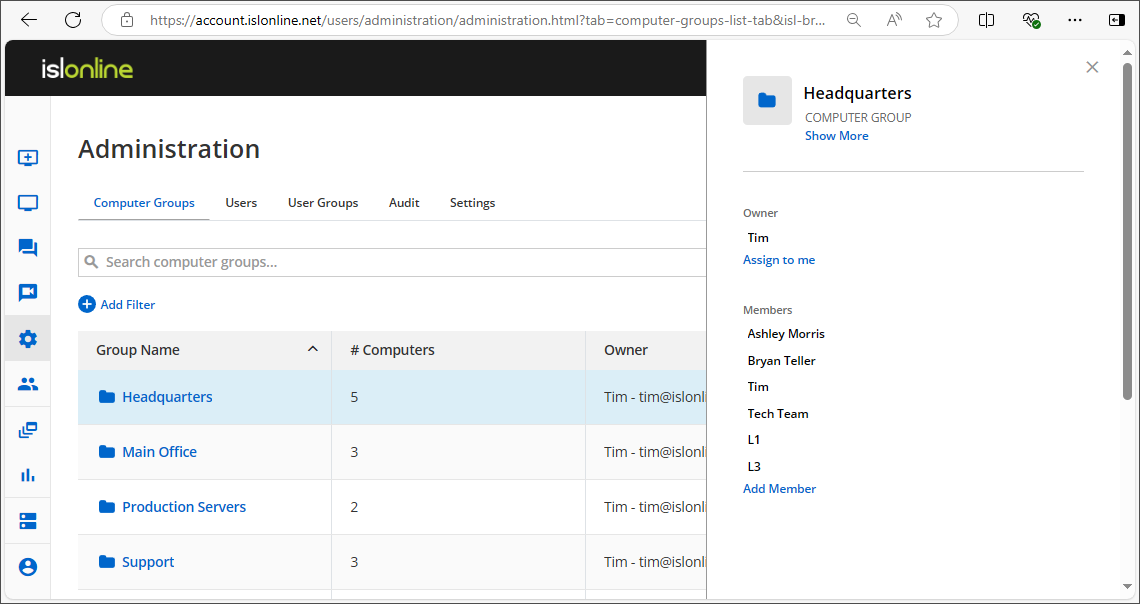
Gruppi di computer
Organizzate e controllate senza problemi tutti i gruppi di computer sotto la vostra gestione.
Utenti
Assegnate i ruoli, gestite le autorizzazioni e assicuratevi che ogni utente abbia accesso alle risorse necessarie.
Audit
Filtrate gli eventi per tipo e vedete quando si sono verificati, se sono andati a buon fine, chi ha avviato l'azione e i dati grezzi dell'evento.
Impostazioni
Gestisci gli orari di accesso programmato ai computer, richiedi l'autenticazione a due fattori (2FA), imposta i requisiti di lunghezza e complessità delle password e molto altro.
Il feedback degli utenti è ciò che apprezziamo di piùlink




Modalità amministrativalink
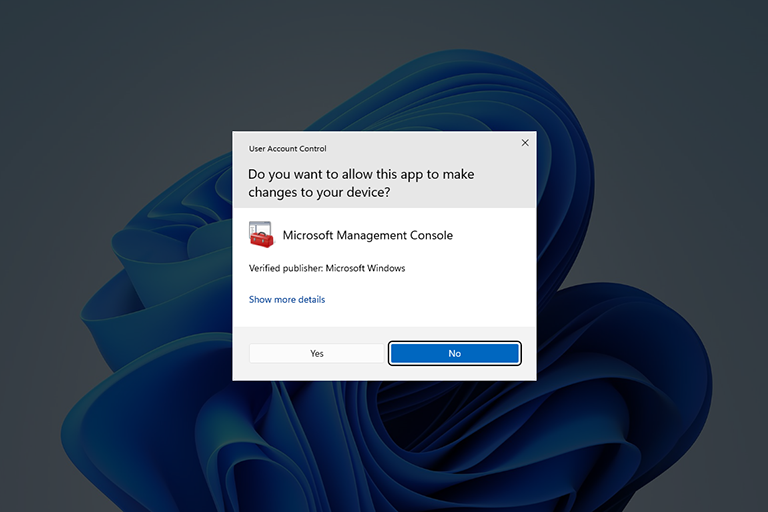
Integrazione perfetta con il Controllo dell'account utente (UAC) di Windows per gestire i computer remoti con pieni diritti amministrativi. Per impostazione predefinita, ISL Light viene eseguito senza permessi di amministrazione, ma è possibile elevare facilmente i permessi per le attività di supporto avanzate, quando necessario.
Riavvia e riprendilink
È possibile riavviare un computer remoto dopo l'installazione di un nuovo software e riconnettersi alla sessione di assistenza remota esistente senza interruzioni.
Leggi il manuale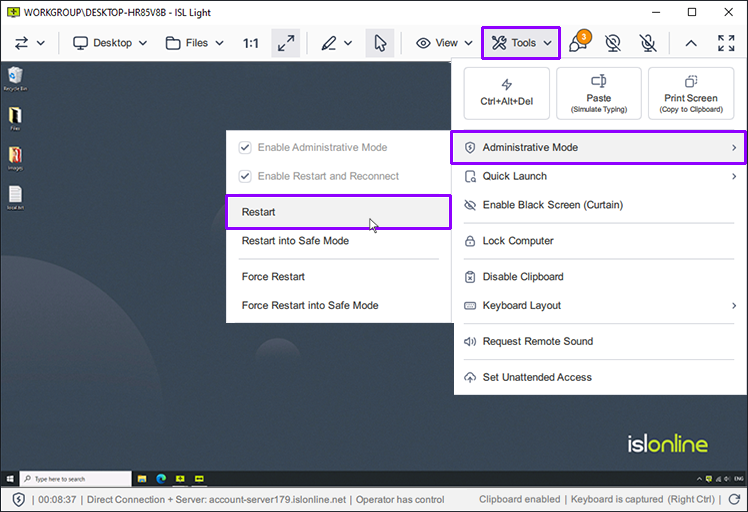
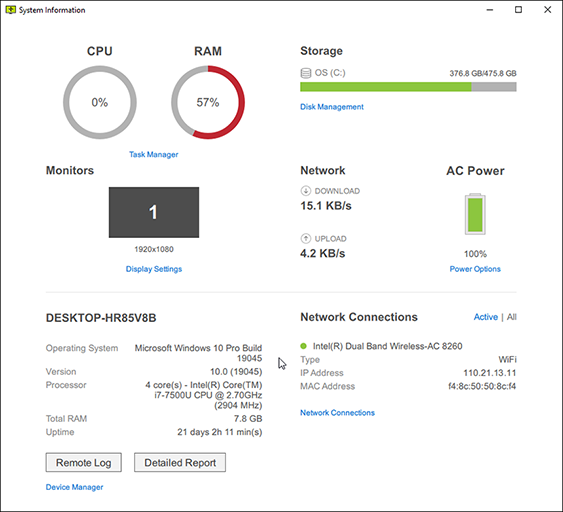
Informazioni di sistemalink
Ottenete una chiara rappresentazione visiva delle informazioni del sistema remoto e generate un rapporto completo.
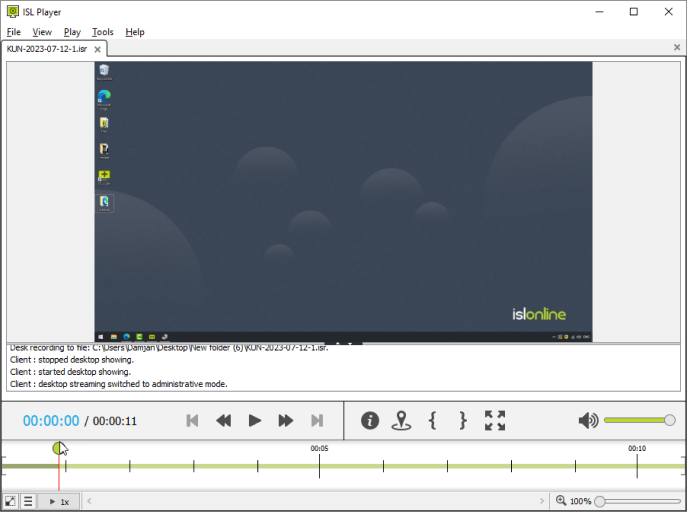
Registra una sessionelink
Configurate la registrazione automatica delle sessioni come misura di sicurezza aggiuntiva o per prevenire potenziali controversie. Acquisizione di condivisione dello schermo, chat, audio e video.
Ottimizzare la vistalink
Migliorate la vostra esperienza di assistenza remota con impostazioni di visualizzazione personalizzabili. Ottimizzate la profondità del colore, la risoluzione dello schermo e la gestione del monitor per ottenere le migliori prestazioni visive.
play_circleGuarda il videoProfondità del colore
È possibile passare rapidamente dalle opzioni “Qualità ottimizzata” e “Velocità ottimizzata”, oppure scegliere tra diverse preimpostazioni dettagliate per trovare il perfetto equilibrio tra chiarezza visiva e prestazioni quando si visualizza uno schermo remoto.
Leggi il manualeRisoluzione dello schermo
Regolate la risoluzione dello schermo del computer remoto in modo che corrisponda alle dimensioni del monitor.
Leggi il manualeMonitor multipli
Durante il controllo di un computer remoto, potete scegliere se visualizzare tutti i monitor remoti in un'unica finestra o se separarli in finestre diverse. Passare da un monitor remoto all'altro o trascinare i file da un monitor all'altro.
Leggi il manuale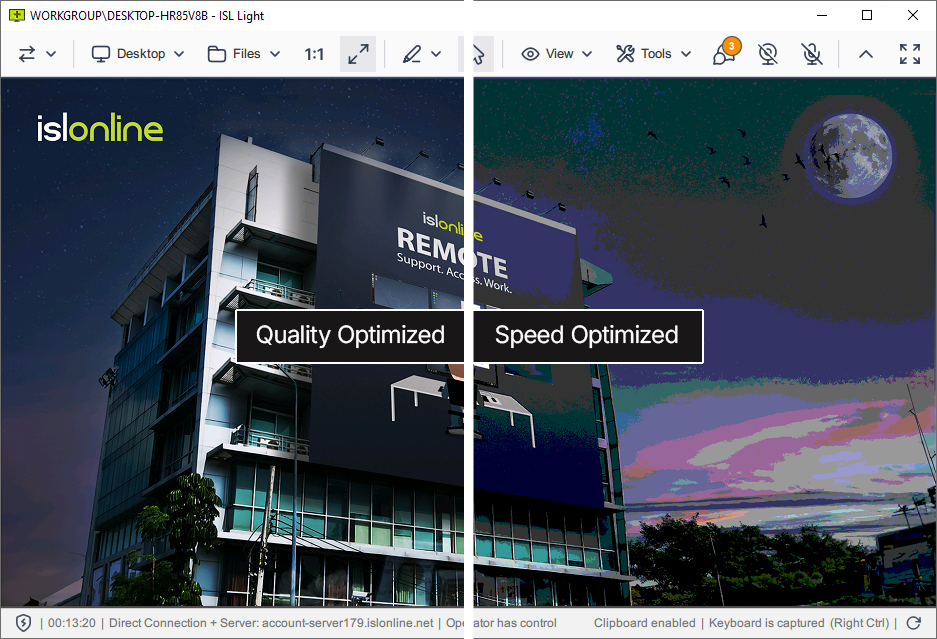
Trasferisci i file in modo sicurolink
Trasferite i file in modo rapido e sicuro tra i computer durante una sessione di desktop remoto. Il File Manager a doppio pannello consente una navigazione rapida e permette di gestire in modo efficiente file e cartelle sia sul computer locale che su quello remoto.
play_circleGuarda il video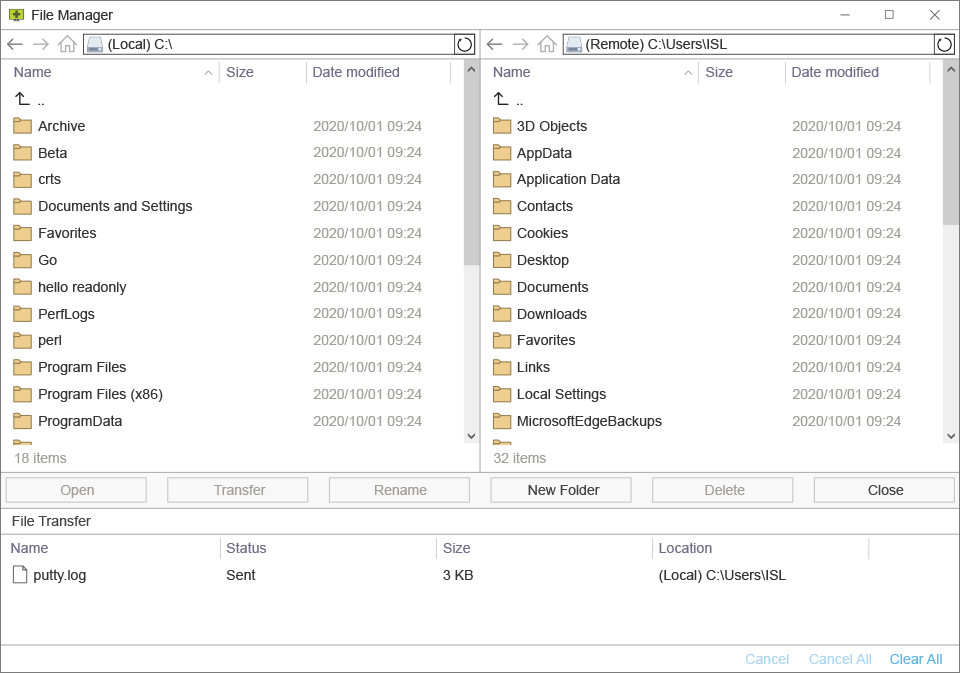
Collaborate con il vostro clientelink
Migliorate l'assistenza ai clienti con strumenti di collaborazione interattiva. Comunicate efficacemente tramite chat, chiamate audio/video e strumenti di annotazione per fornire un'assistenza remota eccezionale.
play_circleGuarda il videoMessaggistica istantanea
Chattate con il cliente durante la sessione di assistenza, scambiate link e allegate le trascrizioni della chat ai ticket di assistenza.
Leggi il manualeChiamata audio/video
Rendete il supporto più personale ed efficace avviando una videochiamata con il vostro cliente.
Leggi il manualeStrumenti di annotazione
Evidenziate aree, disegnate e fornite istruzioni visive per rendere più intuitiva e chiara la risoluzione dei problemi e l'assistenza.
Leggi il manuale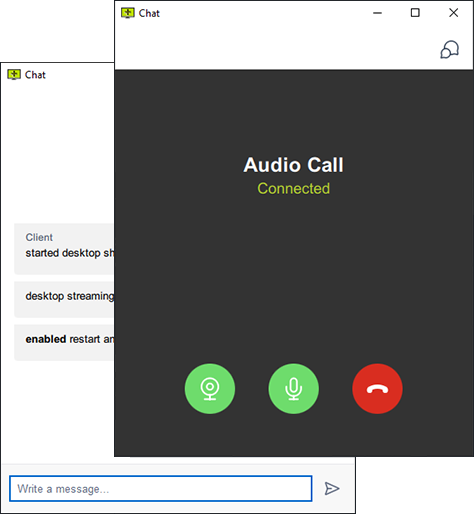
Personalizza l'aspetto dell'applicazionelink
Applicate il vostro marchio e adattate ISL Online al vostro flusso di lavoro.
Logo e colori
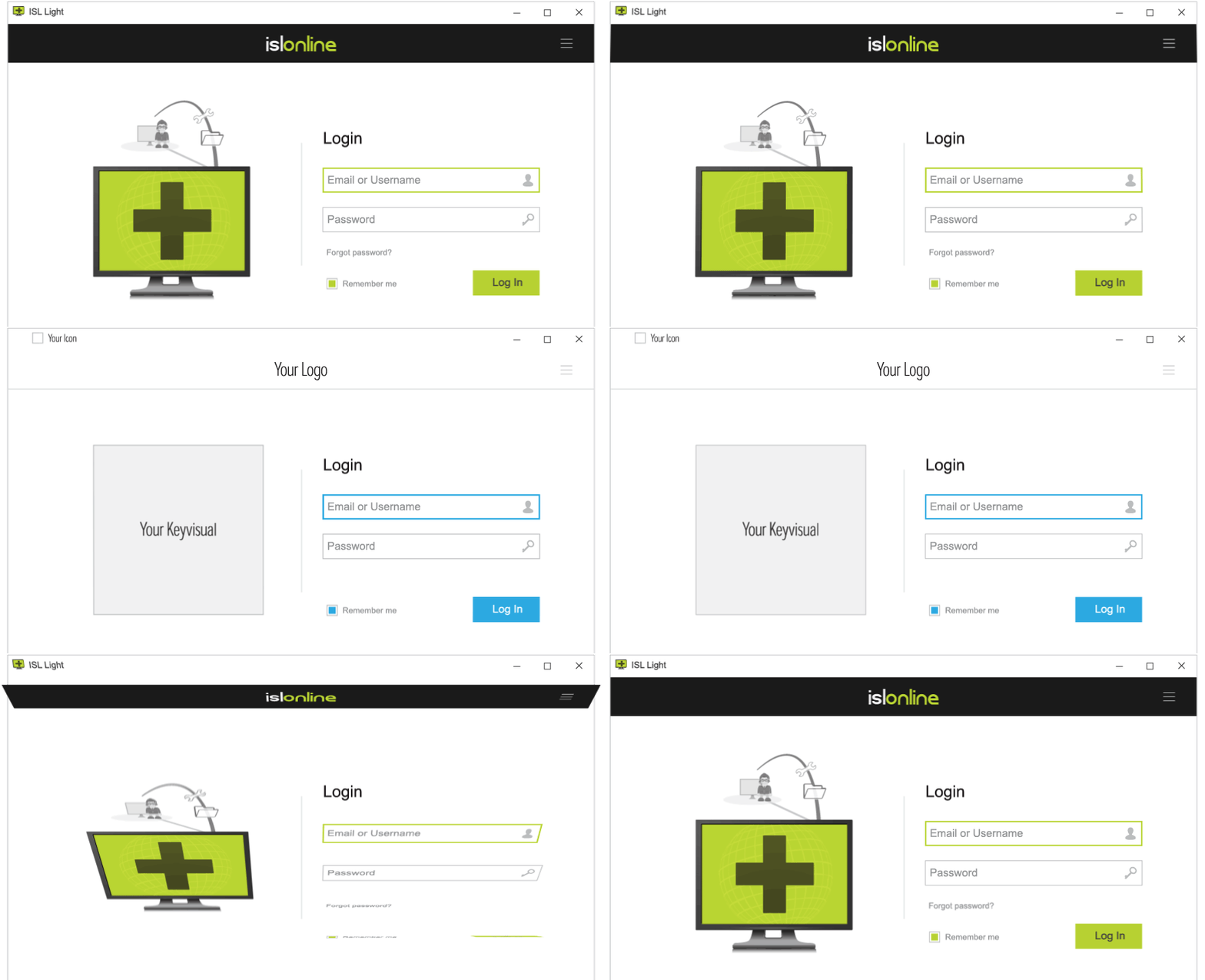
Aggiungete il vostro logo e personalizzate i colori, cambiate i nomi delle applicazioni, le icone e le immagini principali per personalizzare l'aspetto e l'atmosfera.
Leggi il manualeConnectBox
È possibile aggiungere un ConnectBox al proprio sito e chiedere al cliente di partecipare a una sessione attraverso il proprio sito web. ConnectBox è un semplice modulo in cui il cliente può inserire il codice della sessione e fare clic su Connetti.
Leggi il manualeArgomenti della riga di comando
Regolate i flussi di lavoro e il layout dell'applicazione con gli argomenti della riga di comando.
Leggi il manualePunto di accesso personalizzato
Create una pagina web personalizzata con il vostro logo, i link e i colori, che potrete utilizzare per invitare i vostri clienti a partecipare a una sessione di assistenza remota.
Leggi il manualeWebAPI2
WebAPI2 vi permette di integrare ISL Online con i vostri servizi di terze parti o di sviluppare script personalizzati per la gestione delle sessioni di desktop remoto.
Leggi il manualeLingua
ISL Online supporta più lingue, selezionate automaticamente dalle impostazioni regionali, con la possibilità per gli utenti di cambiare manualmente la lingua in qualsiasi momento.
Connessione via RDP/SSHlink
Instrada automaticamente le sessioni Microsoft Remote Desktop Protocol (RDP) o Secure Shell (SSH) tra il computer locale e i computer non presidiati in esecuzione nella rete remota senza utilizzare una VPN o apportare modifiche al firewall.
Jumpbox RDP/SSH
Una Jumpbox è un computer che funge da ponte per la connessione, consentendo di collegarsi a qualsiasi computer della rete locale del computer remoto.
Leggi il manualeCreare un tunnel personalizzato
Oltre alle connessioni RDP e SSH, è possibile eseguire il tunnel di qualsiasi connessione a scelta. La funzionalità di tunnel personalizzato può essere utilizzata una volta stabilita una sessione con il computer remoto. Per i passaggi relativi alla creazione di un tunnel personalizzato verso il computer remoto, consultare il manuale.
Leggi il manuale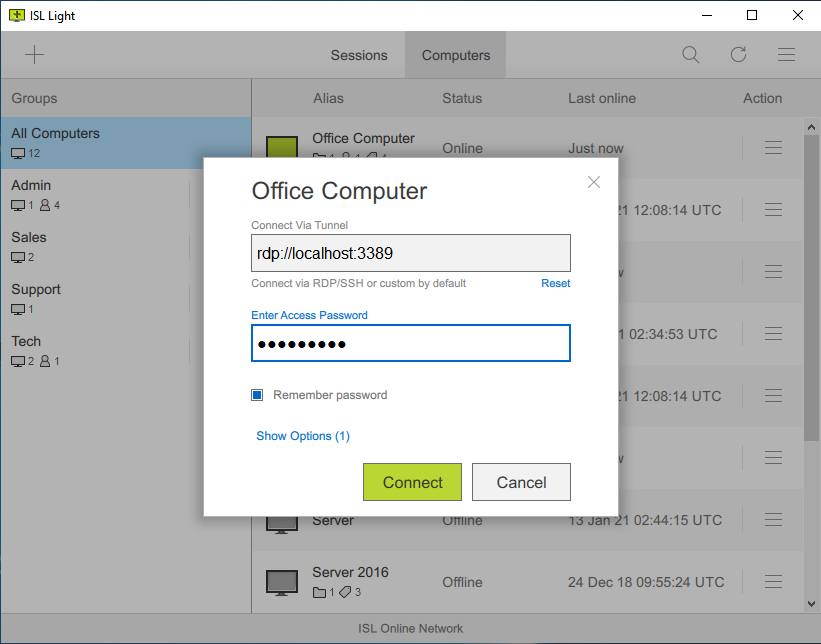
Altre caratteristichelink
Modi per connettersilink
Scegliete come connettervi con i vostri clienti o con i computer remoti non presidiati.
Applicazione desktop (consigliata)
Per una migliore esperienza di desktop remoto, scaricate e installate l'applicazione ISL Light sul vostro computer Windows, macOS o Linux.
Leggi il manualePortale web
Accedete al vostro account ISL Online tramite il browser per avviare una sessione di desktop remoto dal portale web.
Leggi il manualeApp mobile
Procuratevi l'applicazione mobile (iOS, Android) per connettervi dal vostro dispositivo mobile ai computer remoti o per consentire a un tecnico di risolvere i problemi del vostro telefono o tablet.
Leggi il manualeElementi essenzialilink
Scoprite gli strumenti essenziali che renderanno la vostra esperienza di desktop remoto efficiente e piacevole.
Visualizza Desktop remoto
Visualizzare lo schermo di un computer remoto (Windows, macOS o Linux) o di un dispositivo mobile (iOS o Android).
Leggi il manualeTrasferisci sessione
Trasferite la vostra sessione a un collega, consentendogli di riprendere il lavoro e di continuare.
Leggi il manualeInvita un operatore
Invitate un altro tecnico a unirsi alla vostra sessione e a lavorare insieme alla risoluzione dei problemi tecnici.
Leggi il manualeMetti in pausa una Sessione
Mettete in pausa una sessione di assistenza remota e riprendetela immediatamente dopo. Durante la pausa, il cliente può lavorare sul proprio computer senza interruzioni.
Leggi il manualeGestione file
Un file manager a doppio pannello consente di trasferire in modo rapido ed efficiente i file e di gestire le cartelle su computer locali e remoti.
Leggi il manualeMonitor multipli
Passate facilmente da un monitor all'altro o visualizzateli tutti insieme grazie alle modalità di visualizzazione flessibili.
Leggi il manualeProfondità del colore
È possibile passare facilmente dalle modalità “Qualità ottimizzata” e “Velocità ottimizzata” per visualizzare lo schermo remoto, oppure scegliere tra una serie di opzioni di configurazione avanzate.
Leggi il manualeRisoluzione dello schermo
Regolate la risoluzione dello schermo del computer remoto in modo che corrisponda alle dimensioni del monitor.
Leggi il manualeSchermo nero (modalità tendina)
È possibile attivare temporaneamente una schermata nera (tenda) per nascondere le informazioni sensibili.
Leggi il manualeStreaming audio remoto
Riproducete l'audio del computer remoto attraverso gli altoparlanti o le cuffie.
Leggi il manualeModalità amministrativa
Interagite senza problemi con l'UAC di Windows e gestite un computer remoto con diritti amministrativi.
Leggi il manualeRiavvia e riprendi
È possibile riavviare un computer remoto dopo l'installazione di un nuovo software e riconnettersi alla sessione di assistenza remota esistente senza interruzioni.
Leggi il manualeAvvio rapido
Avviare direttamente le applicazioni di sistema essenziali sul computer remoto, come Prompt dei comandi, Gestione dispositivi e Gestione attività, tutto dal computer locale.
Leggi il manualeComandi da tastiera
È possibile eseguire le più comuni scorciatoie da tastiera su un computer remoto, tra cui Ctrl+Alt+Canc.
Leggi il manualeRegistra una sessione
Acquisizione di condivisione dello schermo, chat, audio e video.
Leggi il manualeFinestra di dialogo di fine sessione
Al termine della sessione di assistenza remota, visualizzare un semplice modulo di immissione di testo in cui l'operatore e/o il cliente possono fornire un feedback sulla sessione.
Leggi il manualeCollaborazionelink
Migliorate l'assistenza ai clienti con strumenti di collaborazione interattiva. Comunicate efficacemente tramite chat, chiamate audio/video e strumenti di annotazione per fornire un'assistenza remota di qualità superiore
Chiamata audio/video
Rendete il supporto più personale ed efficace avviando una videochiamata con il vostro cliente.
Leggi il manualeChat
Chattate con il cliente durante la sessione di assistenza, scambiate link e allegate le trascrizioni della chat ai ticket di assistenza.
Leggi il manualeStrumenti di annotazione
Evidenziate aree, disegnate e fornite istruzioni visive per rendere più intuitiva e chiara la risoluzione dei problemi e l'assistenza.
Leggi il manualeI computerslink
Organizzate e controllate senza problemi tutti i computer e i gruppi di computer sotto la vostra gestione.
Collegamento di distribuzione personalizzato
Generate e distribuite un link con i parametri necessari per configurare rapidamente un agente di accesso remoto su più computer remoti.
Leggi il manualeDistribuzione di massa
Utilizzate Microsoft Intune o strumenti di distribuzione simili per installare in blocco gli agenti di accesso remoto su più computer.
Leggi il manualeDistribuzione delle impostazioni
Distribuire un file di registro con le impostazioni desiderate su più computer contemporaneamente.
Leggi il manualeCambia proprietario
Trasferite la proprietà di un computer remoto a un altro utente, concedendogli tutti i diritti di gestione. Il nuovo proprietario potrà spostare, modificare o eliminare il computer.
Leggi il manualeGruppi di computer
Create gruppi di computer (ad esempio, Casa, Ufficio) e aggiungete i computer remoti ai gruppi appropriati.
Leggi il manualeCondividi computer
È possibile condividere un singolo computer o un gruppo di computer con un altro utente o gruppo di utenti, consentendo loro di gestire i computer all'interno del gruppo.
Leggi il manualeTag computer
Aggiungere tag a ciascun computer per trovarli e organizzarli rapidamente in base a tag specifici.
Leggi il manualeScorciatoia per computer
Creare un collegamento a un computer a cui si accede di frequente e posizionarlo sul desktop o appuntarlo sulla barra delle applicazioni per facilitarne l'accesso.
Leggi il manualeCondivisione file
È possibile specificare i file o le cartelle di un computer da rendere accessibili tramite connessione remota.
Leggi il manualeAggiorna ISL AlwaysOn
Aggiornate facilmente l'agente di accesso remoto su tutti i vostri computer con un solo clic.
Leggi il manualePassword accesso
Impostare una password di accesso principale per il computer remoto, una password di accesso alla connessione per i computer condivisi o una password unica per l'accesso temporaneo.
Leggi il manualeNotifiche email
Ricevete una notifica via e-mail ogni volta che una sessione di accesso remoto inizia, termina, fallisce o quando i file vengono scaricati da un computer specifico.
Leggi il manualeConsenso utente locale
Date ai vostri clienti il controllo sull'accettazione o il rifiuto di una connessione di accesso remoto in entrata.
Leggi il manualeRisvegliare un computer remoto
È possibile impostare la funzione Wake-on-LAN (WOL) per accendere un computer da remoto.
Leggi il manualeStoria accessi
La cronologia degli accessi consente di visualizzare e ricercare le connessioni remote effettuate a un computer specifico a fini di verifica.
Leggi il manualeUtentilink
Assegnate i ruoli, gestite le autorizzazioni e assicuratevi che ogni utente abbia accesso alle risorse necessarie.
Autorizzazioni
Impostate autorizzazioni dettagliate per ogni singolo utente o create domini per applicare regole specifiche a tutti gli utenti di un dominio.
Leggi il manualeUso della licenza
Monitorate le sessioni in corso e gestite l'utilizzo delle licenze, con la possibilità di terminare le sessioni attive direttamente dal vostro account quando necessario.
Leggi il manualeAutenticazione esterna
ISL Online si integra con directory utenti esterne come Microsoft Active Directory, NetIQ eDirectory, LDAP, RADIUS e SAML 2.0, consentendo una gestione semplice e sicura degli utenti.
Leggi il manualeAccesso unico (SSO)
Gli utenti della vostra organizzazione sono in grado di accedere al loro account ISL Online attraverso il vostro provider di identità SSO (ad esempio, Microsoft Entra, Okta, ecc.) tramite il protocollo sicuro SAML 2.0.
Leggi il manualeRapporti
Utilizzate i report per ottenere informazioni sull'attività di assistenza remota e prendere decisioni basate sui dati per ottimizzare il flusso di lavoro dell'assistenza.
Leggi il manualePersonalizzazionelink
Applicate il vostro marchio e adattate ISL Online al vostro flusso di lavoro.
Logo e colori
Aggiungete il vostro logo e personalizzate i colori, cambiate i nomi delle applicazioni, le icone e le immagini principali per personalizzare l'aspetto e l'atmosfera
Leggi il manualeLinee di comando
Regolate i flussi di lavoro e il layout dell'applicazione con gli argomenti della riga di comando.
Leggi il manualeBox connessione
Aggiungi una casella di testo sul tuo sito Web per consentire ai tuoi clienti di partecipare ad una sessione di supporto remoto direttamente da lì.
Leggi il manualePunto di accesso personalizzato
Create una pagina web personalizzata con il vostro logo, i link e i colori, che potrete utilizzare per invitare i vostri clienti a partecipare a una sessione di assistenza remota.
Leggi il manualeWebAPI2
WebAPI2 vi permette di integrare ISL Online con i vostri servizi di terze parti o di sviluppare script personalizzati per la gestione delle sessioni di desktop remoto.
Leggi il manualeLingua
ISL Online supporta più lingue, selezionate automaticamente dalle impostazioni regionali, con la possibilità per gli utenti di cambiare manualmente la lingua in qualsiasi momento.
Sicurezzalink
Crittografia avanzata, conformità e solide funzioni di sicurezza.
Per saperne di più sulla sicurezzaCrittografia AES 256 bit
La cifratura AES 256-bit end-to-end protegge i dati in transito tra operatore e cliente.
RSA 2048/4096-bit, ECDSA P-256
Per proteggere i tuoi dati e conformarci ai più restrittivi standard di sicurezza applichiamo tecnologie di sicurezza standard dell'industria.
Autenticazione a due fattori (2FA)
Abilita l'autenticazione a due fattori come ulteriore strato di sicurezza.
Firma del codice
Le applicazioni di ISL Online sono firmate digitalmente con un Certificato di firma del codice, che identifica con sicurezza ISL Online come editore del software.
Filtratura porte
A meno che non si applichi una politica di firewall più rigida, ISL Online funziona con il firewall esistente e non richiede alcuna configurazione aggiuntiva.
Certificazione ISO 27001:2022
La sede centrale di ISL Online possiede la certificazione ISO/IEC 27001:2022, a dimostrazione del nostro impegno nei confronti della sicurezza delle informazioni.
Trasparenza delle funzioni
La funzionalità del software è trasparente e garantisce che il cliente possa sempre monitorare e controllare le azioni svolte dall'operatore dell'helpdesk
Elenchi di permessi/rifiuti
È possibile limitare l'accesso ai dati dei server ISL Online in base agli indirizzi IP e/o MAC.
Opzione intranet (solo LAN)
Se si prevede di utilizzare ISL Online solo all'interno della propria LAN (intranet), non è necessario un indirizzo IP pubblico.
Per saperne di più sulla sicurezza online di ISLlink
Scarica la dichiarazione di sicurezzaProva gratis per 15 giorni
Goditi la nuova esperienza di desktop remoto!
Tutte le caratteristiche incluse. Nessuna carta di credito richiesta.

Pacchetto con PDQ: protezione, patch e gestione dei dispositivi
Scopri PDQ Connect, uno strumento moderno per la gestione dei dispositivi remoti e locali. Automatizza le distribuzioni con pacchetti predefiniti e personalizzati, ottieni informazioni essenziali sull'inventario, correggi automaticamente le vulnerabilità e fornisci assistenza agli utenti finali con il desktop remoto integrato.
